
- Next to the Request tab, select the Response tab.
- Expand the DK1APIC1-Con to display the whole copybook.
- Select the following fields in the WS_ROW_HEADER section:
- IN_API_KEY
- IN_TABLE_NAME
- IN_VTS_NAME
- IN_OFFSET
- IN_LIMIT
- OUT_TOTAL_RECS
- OUT_RECS_THIS_CALL
- OUT_REC_SIZE
- OUT_FILLER
- Right-click to select Add Remove transform.
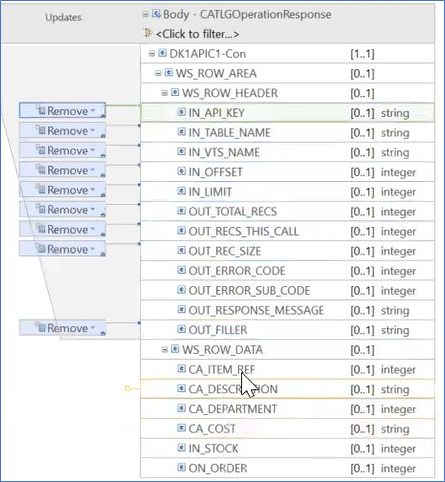
Figure 287. Response Mapping
- Notices
- Preface
- Introduction
- Getting Started with tableBASE RESTConnector
- Designing APIs for Single Record Retrieval
- Designing APIs for Multiple Record Retrieval
- Prerequisites for Multiple Responses
- Create a New Service Project for Multiple Records
- Deploy the Service Project
- Create a New API Project for Multiple Records
- Mapping the GET Method
- Create a new Service Project for Multiple Records with Hexadecimal response
- Deploy The Service Project for Multiple Records with Hexadecimal Response
- Mapping the GET Method
- Testing the RESTConnector
- Error Messages
- Home
- /
- Documentation Archive
- /
- V 7.0.3 RESTConnector User’s Guide
- /
- Designing APIs for Single Record Retrieval